
BILGE-B-DRY Dry Bilge System and the New Mobile App
- Neptunian Sky
- Jan 13
- 4 min read

BILGE-B-DRY connects to your Smart Device (if desired) through the BILGE-B-DRY Mobile App on the Apple & Google Play stores. We will soon be releasing a brand-new Mobile App, where customizable operation will be at your fingertips with multi-device access, event log and charts, water sensor management, cloud backup and sync, Warranty registration, device ID backup, and in-depth Help Features! What will the new Mobile App features look like?
FIRST USE & CONNECTION:
With a new BILGE-B-DRY Dry Bilge System purchase, you will be able to create your own account via the Mobile App, register your BILGE-B-DRY purchase, and connect the Mobile App to your BILGE-B-DRY unit via your personal QR Code or Device ID. With a previous purchase, you can access the “Connect to Legacy Device” option and the Mobile App will automatically search for and connect to your pump.

THE MOBILE APP HOME PAGE:
The new Mobile App Home Page is dedicated to your pump activation. Use the “Status” Menu to check and see if your connected pump is running and if water is detected. You can choose to run your pump on demand with the “Run Pump” drop-down menu for run durations up to 10 minutes. For customized scheduling, choose the "Daily Schedules" menu to manage automated pump schedules. Choose from five schedule options and run durations up to 10 minutes. Check for pump connection using the "Connections" menu at the bottom of the page. You can view the currently connected pump, add a new BILGE-B-DRY pump or switch devices.
THE MOBILE APP MENU:
The Mobile App Menu is the powerhouse of our new Mobile App. The new Menu allows for all the accessibility features you have always wanted! To access the Menu, tap the three horizontal bars in the top upper left-hand corner of the Mobile App Home Page.

Use "Schedule" as a quick link to reach the "Daily Schedules" menu to set-up automated pump schedules for daily operation. Choose from five schedule options and run durations up to 10 minutes.
Access "Event Log" for data monitoring of your pump(s) to include the date, time, and type of activity for your pump or water sensor.
Tap the triangular horizontal bars at the top of the "Event Log" page to filter the displayed data, to include: water detected or cleared by a wired or wireless water sensor, Timer run, Schedule Run, water-triggered run, pump cooldown and device boot.
You can choose to Sort this page by time, type or duration.
Tap the chart symbol at the top of this page for a quick link to the "History Chart" page.
Tap "History Chart" in the Menu to view recorded pump run, cooldown and water detection data under "Pump & Water."
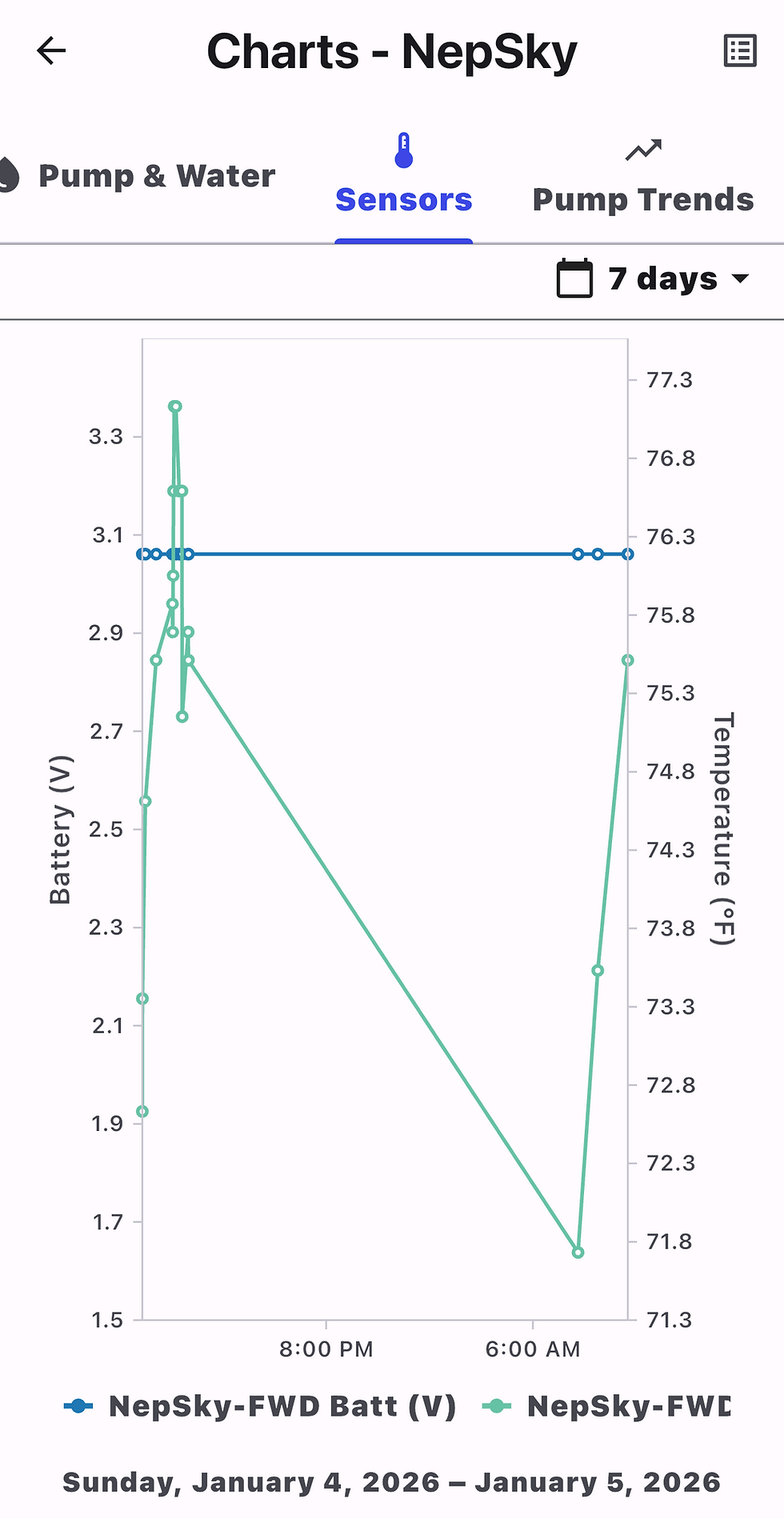
If connected to a wireless water sensor, view trending battery voltage and compartment temperature under the "Sensors" tab.
Use the "Pump Trends" tab to view time ranges with pump activity.

Under the Mobile App Menu, tap "Water Sensor Management" to check water sensor status, to include water sensor configuration, water detection, battery voltage, battery level, sensor temperature, RSSI, and for options to add additional sensors.
If you need to purchase additional BILGE-B-DRY accessories, use "Buy Filters" under the Mobile App Menu to link to our website accessories page for replacement filter material or bilge water pickups.
Choose "Account" in the Menu to view your personal account information, including your email, User ID, the date you created your account, Vessel Information, Purchase Registration, Sync Status and Connected Devices. You can use this section to add purchase details and upload your purchase receipt if you bought your pump from another retailer for a quicker Warranty Claim Process.

Choose "Settings" on the Menu (or the "Settings" widget on the Home Page) for "Pump Settings" "Water Sensors" and "App Settings."
"Pump Settings" include: running your pump after the water sensor reports Water Cleared, running your pump at powerup when your device powers on, and restarting the BILGE-B-DRY device controller.
"Water Sensors" include: enabling a wired water sensor, enabling a wired sensor to a switch, enabling a wireless water sensor, and adding or managing wireless sensors.
"App Settings" include: account and vessel information, automatic connection to the last used device, displayed temperature, pickup filter inspection reminders, inspection intervals, low battery warning for a wireless sensor, wireless sensor offline warning, water detection and water clearance alerts, as well as "Stored Devices."

The "Help" selection on the Mobile App Menu includes articles on: First Use, Installation & Wiring, Proper Electrical Connections, Winterization, Pump Issues, Schedule Issues, Power Issues, Wired Water Sensor Installation, Wireless Water Sensor Installation, and Water Pickup Maintenance.
Browse the "Featured" tab or "Categories" to find the Help article you need.
"Start Warranty Return" at the bottom of the "Help" page allows you to start the Warranty Claim Process.
Choose "About" on the Mobile App Menu for general information about your pump, current Mobile App version, Device Information, Company Information and Privacy Policy.
A YEAR OF PROGRESS
After an entire year of software re-designing our Mobile App, we are excited to launch and showcase the new features you can explore, which we hope will set apart our BILGE-B-DRY Dry Bilge System product line as a leading dry bilge product on the market! We welcome you to view our new updates on our website: Neptunian Sky | BBD Mobile App and reach out to us for questions or comments, as our customer service is our first priority!


Comments